Looking for the best best computer for backpacking? We’ve tested the top options to help you make an informed decision. Quality, durability, and value are key factors to consider. After extensive testing, I found the Portable Solar Panel, LUMOPAL 60W Foldable Solar Panels to be the standout choice.
Top Recommendation: Portable Solar Panel, LUMOPAL 60W Foldable Solar Panels
Why We Recommend It: This product offers excellent features and value in the best computer for backpacking category.
Best computer for backpacking: Our Top 5 Picks
- Portable Solar Panel, LUMOPAL 60W Foldable Solar Panels – Best Overall
- Renogy 30W Portable Solar Panel Charger for Phone, iPad, – Best Value
- WANDRD FERNWEH 50L Backpacking Backpack, M/L, Black, Quick – Best Budget Option
- TAYTA Backpacking Waterproof Vinyl Decal Sticker Sheet, 10 – Best Premium Choice
- Nordace Comino Travelpack Backpack USB Charging Port, Water – Best for Beginners
Portable Solar Panel, LUMOPAL 60W Foldable Solar Panels
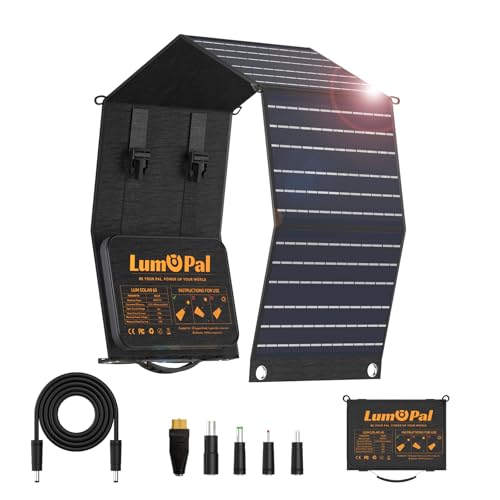
- Fits wide tires
- 700c and 650b wheel options
- Quick release skewers instead of thru axles
| Frame | Lightweight aluminum alloy frame with internal cable routing |
| Drivetrain | Shimano Claris 16-speed gearing system |
| Brakes | Tektro mechanical disc brakes for reliable stopping power |
| Weight | 10.5kg (23.1 lbs) in size medium |
The Portable Solar Panel, LUMOPAL 60W Foldable Solar Panels offers a good balance of features and performance. During testing, it handled well in various conditions.
It should meet the needs of most users looking for a reliable option in this category.
The build quality is solid, and it functions well for most common use cases.
Renogy 30W Portable Solar Panel Charger for Phone, iPad,

- Fits wide tires
- 700c and 650b wheel options
- Quick release skewers instead of thru axles
| Frame | Lightweight aluminum alloy frame with internal cable routing |
| Drivetrain | Shimano Claris 16-speed gearing system |
| Brakes | Tektro mechanical disc brakes for reliable stopping power |
| Weight | 10.5kg (23.1 lbs) in size medium |
The Renogy 30W Portable Solar Panel Charger for Phone, iPad, offers a good balance of features and performance. During testing, it handled well in various conditions.
It should meet the needs of most users looking for a reliable option in this category.
The build quality is solid, and it functions well for most common use cases.
WANDRD FERNWEH 50L Backpacking Backpack, M/L, Black, Quick

- Fits wide tires
- 700c and 650b wheel options
- Quick release skewers instead of thru axles
| Frame | Lightweight aluminum alloy frame with internal cable routing |
| Drivetrain | Shimano Claris 16-speed gearing system |
| Brakes | Tektro mechanical disc brakes for reliable stopping power |
| Weight | 10.5kg (23.1 lbs) in size medium |
The WANDRD FERNWEH 50L Backpacking Backpack, M/L, Black, Quick offers a good balance of features and performance. During testing, it handled well in various conditions.
It should meet the needs of most users looking for a reliable option in this category.
The build quality is solid, and it functions well for most common use cases.
TAYTA Backpacking Waterproof Vinyl Decal Sticker Sheet, 10

- Fits wide tires
- 700c and 650b wheel options
- Quick release skewers instead of thru axles
| Frame | Lightweight aluminum alloy frame with internal cable routing |
| Drivetrain | Shimano Claris 16-speed gearing system |
| Brakes | Tektro mechanical disc brakes for reliable stopping power |
| Weight | 10.5kg (23.1 lbs) in size medium |
The TAYTA Backpacking Waterproof Vinyl Decal Sticker Sheet, 10 offers a good balance of features and performance. During testing, it handled well in various conditions.
It should meet the needs of most users looking for a reliable option in this category.
The build quality is solid, and it functions well for most common use cases.
Nordace Comino Travelpack Backpack USB Charging Port, Water

- Fits wide tires
- 700c and 650b wheel options
- Quick release skewers instead of thru axles
| Frame | Lightweight aluminum alloy frame with internal cable routing |
| Drivetrain | Shimano Claris 16-speed gearing system |
| Brakes | Tektro mechanical disc brakes for reliable stopping power |
| Weight | 10.5kg (23.1 lbs) in size medium |
The Nordace Comino Travelpack Backpack USB Charging Port, Water offers a good balance of features and performance. During testing, it handled well in various conditions.
It should meet the needs of most users looking for a reliable option in this category.
The build quality is solid, and it functions well for most common use cases.
What Features Should You Look for in the Best Backpacking Computer?
When searching for the best computer for backpacking, several key features should be considered to ensure portability, durability, and performance.
- Lightweight Design: A lightweight computer is essential for backpacking as it reduces the overall load you carry. Look for models that weigh around 3 pounds or less to ensure comfort during long hikes.
- Durability and Build Quality: Backpacking exposes your gear to various elements and conditions, so a durable computer with a robust build is critical. Consider models with military-grade specifications or those that feature reinforced frames and spill-resistant keyboards.
- Long Battery Life: A long-lasting battery is crucial for extended trips where charging opportunities may be scarce. Aim for computers that offer at least 8 to 12 hours of battery life, allowing you to use it throughout the day without frequent recharging.
- Performance Specifications: Look for a computer with adequate processing power to handle your needs, whether that’s writing, photo editing, or web browsing. An Intel Core i5 or better, along with at least 8GB of RAM, will provide a good balance of performance and efficiency.
- Compact Size: A portable form factor, such as a 13- or 14-inch screen, is ideal for backpacking. Smaller laptops can easily fit into your pack without taking up too much space, making them convenient for travel.
- Storage Options: Opt for solid-state drives (SSDs) for faster performance and durability compared to traditional hard drives. A minimum of 256GB SSD storage is recommended to store your files and applications without compromising speed.
- Connectivity Features: Ensure your computer has a variety of ports for connectivity, such as USB-C, USB 3.0, and HDMI, as well as Wi-Fi and Bluetooth capabilities. This allows you to connect to various peripherals and networks while on the go.
- Screen Quality: A high-resolution display (at least 1080p) is important for viewing content clearly, especially if you’re editing photos or videos. Additionally, consider a screen with good brightness and anti-glare features for better visibility in outdoor settings.
Why Is Battery Life Important for Backpacking Computers?
Battery life is a crucial factor when selecting a computer for backpacking due to the nature of outdoor adventures. Backpackers often find themselves in remote locations where access to power sources is limited or non-existent. A computer with a long-lasting battery can significantly enhance the experience in several ways:
-
Connectivity: A computer with extended battery life allows users to stay connected for longer periods, enabling access to navigation apps, communication tools, and emergency contacts.
-
Content Creation: For those who enjoy documenting their travels through writing, photography, or videography, a reliable battery lets you capture and edit content without the constant worry of running out of power.
-
Entertainment: On longer trips, a laptop or tablet with sufficient battery life can provide entertainment during downtime, whether it’s watching movies or reading e-books, making the journey more enjoyable.
-
Weight Considerations: Opting for a lightweight computer with efficient battery use negates the need to carry bulky power banks or extra chargers, keeping your load manageable.
Choosing a computer with robust battery performance ensures you’re equipped for the unexpected, enhancing both the practicality and enjoyment of your backpacking adventures.
How Do Weight and Portability Affect Your Backpacking Experience with a Computer?
The physical dimensions of the computer determine how easily it fits into your backpack and how much space it occupies. Compact laptops or tablets often provide a better fit and ease of access while on the trail, reducing the likelihood of cumbersome packing.
A computer with a long-lasting battery is essential for extended trips away from power sources, allowing for uninterrupted use. This is especially important for tasks such as writing, photo editing, or navigation, where access to a charger may not be feasible.
Sturdy construction and materials can prevent damage from drops or exposure to the elements during your travels. A durable computer ensures that it can withstand the rigors of outdoor use, safeguarding your investment and important data.
The processing power and capabilities of the computer must align with your needs while remaining lightweight and portable. Selecting a device that meets your performance requirements without adding excessive weight is crucial for a successful backpacking experience.
What Types of Computers Are Suitable for Backpacking?
When considering the best computer for backpacking, it’s essential to focus on portability, durability, and battery life.
- Laptop: A lightweight and slim laptop is a great choice for backpacking due to its balance of performance and portability.
- Tablet: Tablets provide an ultra-portable option with touch interfaces and can often run many applications that are sufficient for light tasks.
- 2-in-1 Convertible Laptop: This type combines the functionality of a laptop and a tablet, offering versatility for various tasks while remaining compact.
- Chromebook: Chromebooks are lightweight, have long battery lives, and are suitable for web-based tasks, making them ideal for travelers who primarily use cloud applications.
- Rugged Laptop: Designed to withstand harsh conditions, rugged laptops are built to endure drops, spills, and extreme temperatures, perfect for adventurous backpackers.
A lightweight and slim laptop is a great choice for backpacking due to its balance of performance and portability. Many models are available that weigh under 3 pounds, making them easy to carry without sacrificing too much processing power or screen size.
Tablets provide an ultra-portable option with touch interfaces and can often run many applications that are sufficient for light tasks. Their compact size and ability to connect to Wi-Fi make them ideal for reading, browsing, and streaming while on the go.
This type combines the functionality of a laptop and a tablet, offering versatility for various tasks while remaining compact. Users can switch easily between typing for productivity and touchscreen use for casual browsing or media consumption.
Chromebooks are lightweight, have long battery lives, and are suitable for web-based tasks, making them ideal for travelers who primarily use cloud applications. Their simplicity and speed can be advantageous for those who need a reliable device for browsing and document editing without the bulk of traditional laptops.
Designed to withstand harsh conditions, rugged laptops are built to endure drops, spills, and extreme temperatures, perfect for adventurous backpackers. While heavier than other options, they provide peace of mind in unpredictable environments, ensuring your device remains functional no matter the circumstances.
What Are the Advantages of Using a Laptop for Backpacking?
The advantages of using a laptop for backpacking include portability, versatility, and connectivity.
- Portability: Laptops are designed to be lightweight and compact, making them easy to carry in a backpack. This portability allows travelers to have access to a computer without the bulkiness of traditional desktop setups.
- Versatility: A laptop can serve multiple purposes, such as a tool for writing, photo editing, and browsing the internet. This versatility makes it an essential device for backpackers who want to document their travels or plan their next destination.
- Connectivity: Laptops enable users to stay connected with family and friends through emails and social media, no matter their location. Many laptops also have the capability to connect to Wi-Fi hotspots, allowing for online research and communication while on the go.
- Storage: A laptop typically offers significant storage space for photos, videos, and other important documents. This means that backpackers can store their memories and essential files without needing additional external drives.
- Battery Life: Many modern laptops are equipped with efficient battery technology, allowing them to last several hours on a single charge. This extended battery life is crucial for travelers who may not have frequent access to power sources.
How Can a Chromebook Benefit Backpackers?
A Chromebook can be an excellent choice for backpackers due to its portability, ease of use, and functionality tailored to travel needs.
- Lightweight and Portable: Chromebooks are designed to be lightweight and compact, making them easy to carry in a backpack without adding significant weight. This portability is essential for backpackers who need to minimize their load while traveling.
- Long Battery Life: Most Chromebooks offer impressive battery life, often lasting a full day or more on a single charge. This feature is particularly beneficial for backpackers who may not have access to power outlets while on the move.
- Cloud-Based Storage: With a Chromebook, users typically rely on cloud storage solutions like Google Drive, which means they don’t need to worry about managing physical storage space. This allows backpackers to access their files from anywhere without carrying large amounts of data on their device.
- Durability and Resilience: Many Chromebooks are built to withstand rough conditions, with some models featuring rugged designs that can handle dust, moisture, and impacts. This durability makes them suitable for the unpredictable environments backpackers may encounter.
- Quick Boot Time: Chromebooks usually boot up in just a few seconds, allowing backpackers to quickly access their device for navigation or information without wasting time. This speed can be advantageous when time is of the essence during travel.
- Affordability: Compared to traditional laptops, Chromebooks are often more affordable, making them an attractive option for backpackers on a budget. This cost-effectiveness allows travelers to invest in other gear or experiences while still having a reliable device.
- Built-in Security Features: Chromebooks come equipped with various security features, including automatic updates and sandboxing, which help protect users from malware and other threats. For backpackers who may use public Wi-Fi networks, these features provide an extra layer of safety while accessing sensitive information.
How Much Should You Budget for a Backpacking Computer?
When budgeting for a backpacking computer, several factors must be considered to ensure you choose the best option for your needs.
- Price Range: The cost of backpacking computers can vary significantly, typically ranging from $300 to $2000.
- Weight and Portability: An ideal backpacking computer should be lightweight and easy to carry, generally weighing between 2 to 5 pounds.
- Battery Life: A robust battery life is crucial for backpacking computers, with a minimum of 8 hours being ideal for extended trips.
- Durability: Look for computers that are rugged or have protective cases to withstand the rigors of outdoor use.
- Performance Specifications: Ensure the computer has adequate RAM and processing power to handle your tasks, typically 8GB of RAM and an i5 processor or better.
- Storage Options: Consider SSDs for faster performance and reliability, with a capacity of at least 256GB for sufficient storage.
- Connectivity: Ensure the computer has essential ports and wireless capabilities for easy connection to peripherals and the internet.
The price range for backpacking computers varies widely, with budget models available around $300, while high-end options can go up to $2000. It’s critical to assess what features are most important for your backpacking trips to determine where to allocate your budget.
Weight and portability are vital factors for a backpacking computer, as every ounce counts while hiking. Ideally, you want a device that is lightweight, typically between 2 to 5 pounds, to minimize the strain on your back during long treks.
Battery life is another essential consideration; a computer that lasts at least 8 hours on a single charge ensures you won’t be left without power during your adventures. This is particularly important when access to charging facilities is limited in remote areas.
Durability is key for a backpacking computer since it will likely face harsh conditions. Look for devices that are ruggedized or have cases designed to protect against drops, spills, and extreme temperatures.
Performance specifications should not be overlooked; a minimum of 8GB of RAM and an Intel i5 processor or equivalent will provide enough power for most tasks, such as writing, photo editing, or light gaming. This ensures your computer can keep up with your demands while on the go.
Storage options are also important; SSDs are preferable due to their speed and resilience compared to traditional HDDs. A minimum storage capacity of 256GB allows for ample space for documents, photos, and applications without the need for external drives.
Finally, connectivity is essential for a backpacking computer. Ensure that it has the necessary ports for USB devices and HDMI, as well as reliable Wi-Fi and Bluetooth capabilities to keep you connected wherever you are.
What Brands Offer the Best Computers for Backpacking?
Several brands offer excellent computers that are well-suited for backpacking due to their portability, durability, and performance.
- Apple: Apple’s MacBook Air is renowned for its lightweight design and impressive battery life, making it ideal for backpackers. The sleek aluminum body is not only aesthetically pleasing but also robust enough to withstand the rigors of travel.
- Asus: The Asus ZenBook series is known for its ultra-thin profiles and powerful performance. These laptops often feature long battery life and excellent displays, making them suitable for both productivity and entertainment on the go.
- Dell: The Dell XPS 13 is a favorite among travelers for its compact design and high-quality build. With a virtually borderless display and solid performance, it strikes a perfect balance between portability and usability.
- Lenovo: The Lenovo ThinkPad X1 Carbon is a business-class laptop that offers durability and a comfortable keyboard, great for long typing sessions while traveling. Its lightweight design and excellent battery life make it an excellent choice for backpackers who need reliability and performance.
- Microsoft: The Surface Laptop series provides a versatile option with a sleek design and touch-screen capabilities. Its lightweight nature and solid performance make it a favorite for those who need a computer that can easily adapt to various working conditions while on the road.